Practical AI: AI Agents (Agentic AI)

An AI Agent is an AI system that can plan tasks, use available tools, take actions, and evaluate results to achieve a goal.

Unlike a traditional chatbot that primarily answers questions, an AI agent can carry out a multi-step workflow when it has the appropriate tools and permissions.

How an AI Agent works
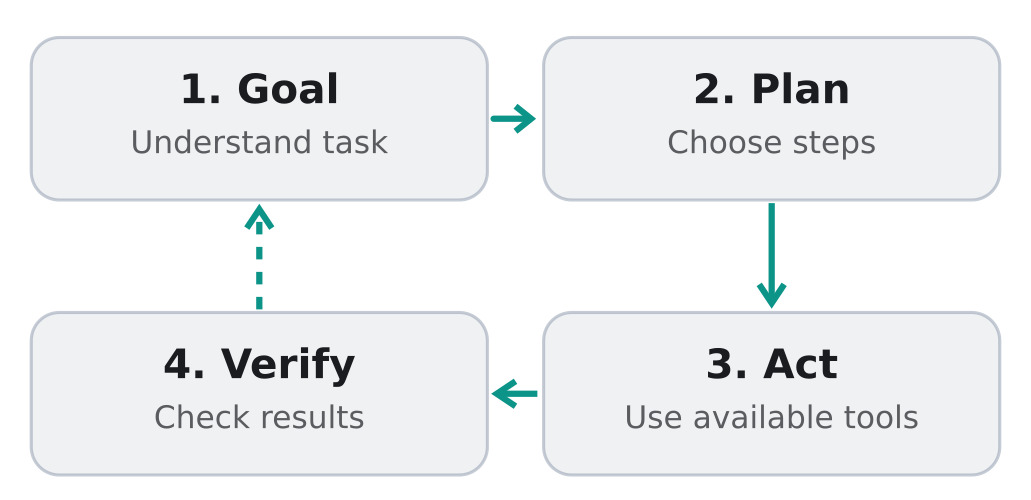
The agent can repeat planning and execution when verification shows a problem.

Apply it today: Plan your day using an AI agent

Imagine asking an AI agent:

“Review my calendar, pending tasks, and important emails. Identify scheduling conflicts, prioritize my activities, and prepare a realistic plan for today.”

With connected tools and permission, an agent could inspect your calendar, identify conflicting commitments, draft responses, and propose schedule adjustments.

Without those integrations, AI can still help you prepare a plan from information you provide.

Try this practical prompt

Act as my personal productivity agent. Review the meetings and tasks I provide. Identify my three most important priorities, suggest an efficient schedule, and highlight any conflicts or dependencies. Explain your recommendations. Ask for approval before making any changes.

AI lesson: Chatbot vs. AI Agent

ChatbotAI Agent
Answers questionsPursues goals
Generates suggestionsCan execute actions with tools
Usually responds one step at a timeCan coordinate multiple steps
User drives each stepCan proceed within approved boundaries

Today’s takeaway: AI agents move from generating answers toward getting tasks done.

5-minute challenge: Give AI your top five tasks for today and ask it to create an actionable execution plan with priorities, time estimates, and dependencies.

Practical AI: Few-Shot Prompting

Few-shot prompting is a technique where you give AI a few examples of the results you want before asking it to perform a similar task.

Unlike zero-shot prompting, which provides instructions without examples, few-shot prompting helps AI understand your preferred format, categories, and decision rules.

How it works

Give examples=>AI identifies pattern=>Apply to new tasks

Apply it today: Organize your daily to-do list

You can teach AI your task-prioritization preferences using three examples.

Classify my tasks using these examples:

Example 1: “Submit a report due today” → Urgent
Example 2: “Learn AI for 20 minutes” → Learning
Example 3: “Await vendor response” → Waiting

Now classify my remaining tasks using the same categories. Explain each classification briefly. Do not assume missing deadlines.

Key takeaway

Few-shot prompting = Instructions + Examples + New Task.

The AI uses your examples as temporary context; it does not permanently retrain itself. Good examples can improve consistency, but you should still verify the output

Challenge: Compare the AI’s classifications with your own and see whether providing examples improves accuracy.

Prompt Response example

From the Snella Task Log, I found one task with a specific overdue deadline and two explicitly waiting on others:

  • Urgent: T085
  • Waiting: T096
  • Waiting: T114

The other logged tasks are open, active, planned, or under investigation, but the log doesn’t identify them as learning tasks or give them a deadline that would make them Urgent. I’ve left them unclassified rather than infer a category.

Practical AI: Human-in-the-Loop

Human-in-the-loop means AI performs part of a task, but a person reviews, corrects, or approves the result before it is used.

Examples include:

  • AI drafts an email; you verify the tone and facts.
  • AI identifies suspicious transactions; a person decides whether they are fraudulent.

In simple words:

Let AI accelerate the work, but keep human judgment for important decisions.

Use AI to prepare your daily task priorities, but approve the final order yourself.

Try this prompt:

“Review these tasks and rank them by urgency, importance, effort, and deadline. Explain the top three recommendations. Do not remove or postpone any task without highlighting it for my approval.”

Then review:

  1. Did AI understand the deadlines correctly?
  2. Is any important context missing?
  3. Would changing the order create a risk?

Why it is useful

AI can process information quickly, but it may misunderstand context or make unsupported assumptions. Human review combines AI’s speed with your experience and accountability.

A useful rule:

AI proposes; the human verifies and decides.

Practical AI: Retrieval-Augmented Generation (RAG)

RAG is a technique that helps AI answer questions using information retrieved from documents, notes, or databases instead of relying only on what it learned during training.

For example, when you ask AI about a project meeting, a RAG system can search the meeting notes, retrieve relevant passages, and use them to generate an answer.

Your question =>Retrieve notes=>Grounded answer

Find action items in meeting notes

Take one meeting summary or project document and upload it to ChatGPT.

Prompt

“Using only this document, identify my action items, deadlines, dependencies, and unresolved questions. Cite the relevant sections. If information is missing, say ‘Not specified.’”

Key lesson

RAG = Retrieve relevant information + Generate an answer.

Unlike model training, RAG can use newly supplied information without changing the model’s underlying parameters.

Remember that retrieved documents can still be outdated or incorrect. Always verify important decisions against their original sources.

RAG improves an AI’s response by first retrieving relevant information from trusted sources and then generating an answer using that information.

For example, instead of relying only on general knowledge, AI can search your:

  • Project documents
  • Meeting notes
  • Product manuals
  • Company knowledge base

In simple words, RAG helps AI answer:

“What do the available sources say about this question?”

Practical AI: Prediction

Prediction is when AI uses past information to estimate what may happen next.

Examples:

A weather app predicts rain.

A shopping app predicts what you may buy.

In simple words, prediction helps AI answer:

“Based on what happened before, what is likely to happen next?”

Apply it today

Use prediction to plan your time better.

Before starting your day, list 3 tasks and predict how long each one will take:

TaskMy predictionActual time
Reply to emails30 min
Review document45 min
Learn AI concept20 min

At the end of the day, fill in the actual time.

After a few days, you will see patterns like:

“I usually underestimate email time.”

Then you can plan more realistically.

Try this prompt

“Here are my tasks and the time I predicted for each: [task, prection,actual, email,20,20,chat,20.,30,learning,30,20, email,20,40,chat,20.,20,learning,30,00,email,20,10,chat,20.,40,learning,30,20]. Help me estimate realistic timings and suggest a better daily plan.”

Response

I read this as three rounds of email, chat, and learning, with times in minutes. Assuming “00” means zero, your totals were 210 minutes predicted and 200 minutes actual.

TaskPredictedActualWhat to plan
Email (3 sessions)60 min70 min25 min per session
Chat (3 sessions)60 min90 min30 min per session
Learning (3 sessions)90 min40 min20 min per session

Email ran a little over estimate, while chat took half again as long as planned. Learning’s actuals were 20, 0, and 20 minutes; if that zero means a canceled or untracked session, 20 minutes is a better estimate for a session you complete.

Suggested plan: Set aside about 3 hours 45 minutes of focused work, plus short transitions. For example: repeat this cycle three times—25 min email, 30 min chat, 20 min learning—with 5-minute gaps between tasks. That’s about 4 hours 25 minutes total, including the gaps. Put learning in a time of day when you can focus, and use the extra time as a buffer if email or chat runs long.

Prediction is useful because it helps you make better decisions before the day becomes busy.

Practical AI: Anomaly Detection

Anomaly detection is when AI notices something unusual compared with normal patterns.

Examples:

A bank detects unusual card spending.

A phone warns about suspicious login activity.

In simple words, anomaly detection helps AI answer:

“Is something different from the normal pattern?”

Apply it today

Use anomaly detection to manage your spending.

Create a simple weekly expense check:

CategoryNormal spendingThis weekUnusual?
Food₹2,000₹3,500Yes
Transport₹1,000₹900No
Shopping₹1,500₹4,000Yes

When something looks unusual, ask:

“Why did this increase?”

Maybe it was necessary, or maybe it shows a habit you can improve.

Try this prompt

“Here are my weekly expenses: [paste list]. Compare them with my normal spending and identify unusual increases. Suggest where I can reduce costs without affecting important needs.”

Anomaly detection is useful because it helps you notice problems early instead of discovering them after they become bigger.

Prompt

“Here are my weekly expenses: vegetable 100,200,250,300 gadgets 1000,5000,0,0. My average spending on vegetables is 200 and gadgets is 500. Compare them with my normal spending and identify unusual increases. Suggest where I can reduce costs without affecting important needs.”

Response

Your vegetable spending is close to your stated normal of 200 per week: it ranges from 100 to 300, and the four-week average is 212.50. The 300 week was 100 above normal.

Gadget spending is much less consistent. It ranges from 0 to 5,000, and the four-week average is 1,500, not the stated normal of 500. The 5,000 week is the main unusual increase; even the 1,000 week was twice your normal.

To reduce costs without affecting important needs, review what made up the 5,000 gadget spend. If it was a one-time or optional purchase, consider delaying similar purchases, setting a weekly gadget limit, or comparing prices. Keep essential household or work-related purchases separate from discretionary ones. For vegetables, compare prices or plan meals around seasonal options, but there’s no clear sign of a major overspend from these figures.

Practical AI: Recommendation Systems

A recommendation system is an AI method that suggests useful options based on patterns in your behavior, preferences, or similar people’s choices.

Examples:

Netflix recommends movies.

Amazon recommends products.

In simple words, a recommendation system helps AI answer:

“Based on what you liked before, what might be useful next?”

Apply it today

Use this idea to improve your daily learning.

Create a simple personal recommendation list for yourself:

What I didWhat I likedWhat I should try next
Watched a short AI videoEasy explanationWatch another beginner AI video
Used AI to plan my daySaved timeUse AI to plan tomorrow’s tasks
Read about classificationHelpful for organizing workTry classifying emails or tasks

This helps you build your own learning path instead of randomly choosing topics.

Try this prompt

“Based on these AI topics I already learned — prompting, classification, and pattern recognition — recommend the next 5 AI concepts I should learn. Keep them practical and explain how each one applies to daily life.”

Recommendation systems are powerful because they reduce decision effort. Instead of asking, “What should I do next?”, you use past choices to make a smarter next choice.