A golden dataset is a carefully prepared collection of test examples with verified expected answers. It helps determine whether an AI model performs reliably on the tasks that matter to you.
Think of it as a regression test suite for AI.
How it works
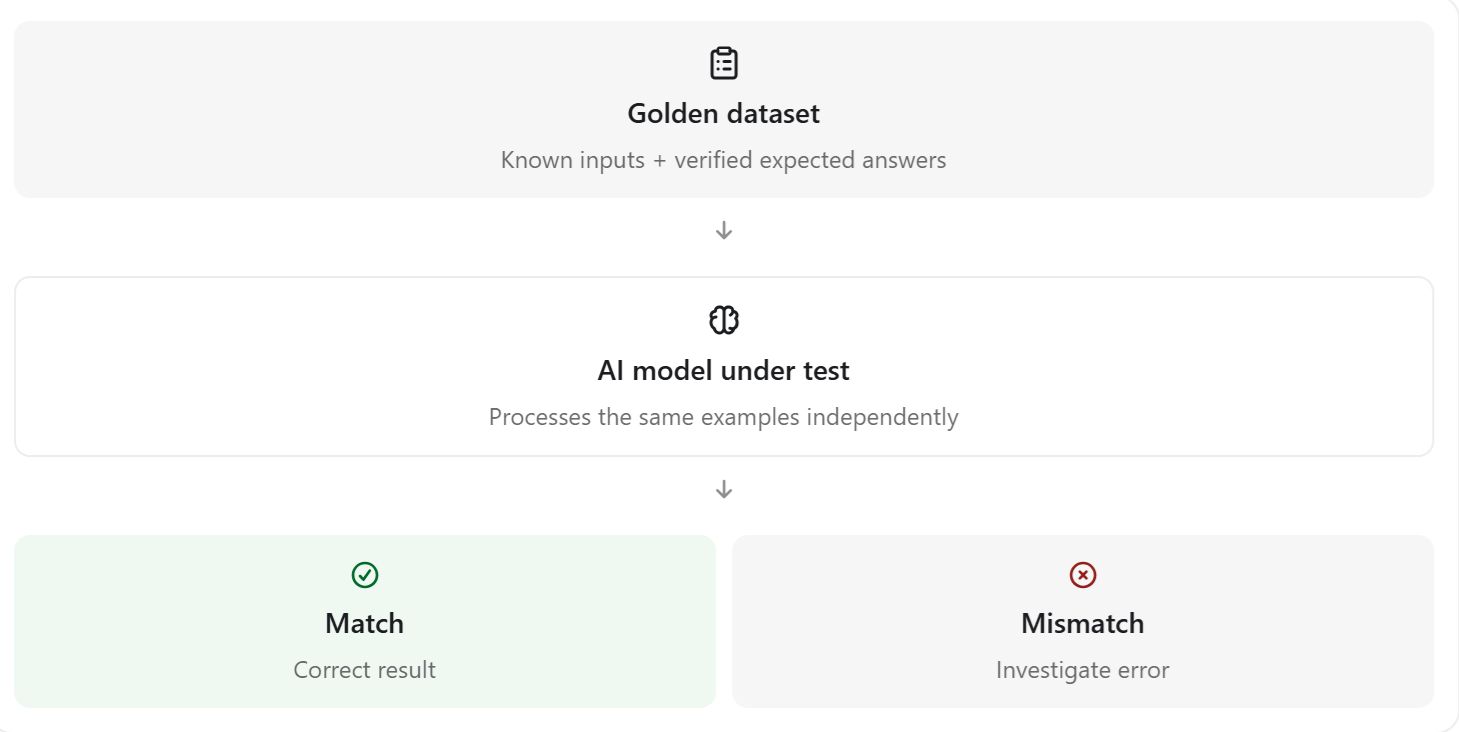
Unlike ordinary software tests, AI evaluation often needs to account for multiple acceptable answers, not just exact text matches.
Everyday application: Validate AI-generated engineering summaries
Suppose you use AI to summarize firmware defects. Before trusting it for routine work, prepare five anonymized defects with verified root causes and expected summaries.
Run the AI against these examples and check whether it preserves important technical facts.
Evaluate an AI firmware defect summarizer using these three examples:
- Input: Drive 14 reports 202170 POH; verified value is 5562.
Expected: Identify incorrect power-on-hours reporting without changing the verified value. - Input: Firmware update times out; root cause not yet established.
Expected: Report timeout and explicitly state that root cause is unknown. - Input: Redfish endpoint returns HTTP 404 for a documented resource.
Expected: Report missing resource; do not assume the cause.
For each case, generate a summary and compare it against the expected answer. Identify factual errors, missing details, and unsupported assumptions. Do not treat the expected answer as model-generated evidence.
Spend five minutes reviewing the examples and testing the copied prompt. For a meaningful benchmark, keep the expected answers separate from the model being tested, then compare its outputs afterward.
Example Prompt: Drive 14 reports 202170 POH; verified value is 5562. What is the reason?
Responses
- Chatgpt:
- The numbers have an exact split: 202,170 = 5,562 + (3 × 65,536). In hex, 202,170 is
0x000315BA; its low 16 bits are0x15BA, or 5,562. - That points to the report combining an extra high-order value (
3) with the POH count—likely a SMART data decoding or field-width issue. I can’t confirm which field was included without Drive 14’s raw SMART data and the report source; those aren’t in the workspace.
- The numbers have an exact split: 202,170 = 5,562 + (3 × 65,536). In hex, 202,170 is
- Meta:
- It’s a decoding error, not real usage.
- 202,170 hours = ~23 years powered on continuously, which is impossible for this drive.
- 5,562 hours = ~232 days powered on, which is plausible.
- The maths
- $$202170 – 5562 = 196608$$
- $$196608 = 0x30000$$
- In hex:
- Reported value:
0x315BA - Verified value:
0x15BA= 5,562 - So the reporting tool is including extra vendor-packed bits
0x3in the high part of the raw value. The true Power-On Hours are in the low bits. - This is a known Seagate SMART quirk: Seagate packs several counters into one raw value, so large raw values look alarming when read as a single decimal count. Other reports show the actual hours stored in the lower bytes, with the upper bytes carrying separate/fractional data.
- What to trust
- Use 5,562 hours.
- Check it with a tool that interprets Seagate SMART correctly, such as Seagate SeaTools, or view the raw value in hex and read only the low-order POH field.
- Gemini:
- The discrepancy is caused by a vendor-specific multi-byte SMART encoding (most commonly seen in Seagate drives) where additional data is packed into the upper bytes of the raw Power-On Hours (POH) field. [1, 2]
Mathematical Breakdown
Reported Value (202170): In hexadecimal, this value is0x0000000315BA.
Verified Value (5562): In hexadecimal, your actual hours are0x0000000015BA.
The Difference (196608): The extra0x30000(which equals3 × 65,536hours) sits in the third byte of the 6-byte raw SMART attribute field.
Why This Happens
Packed Raw Fields: The S.M.A.R.T. Attribute 9 raw data field is 48 bits (6 bytes) long. While the lower 16 bits (0x15BA) store the actual power-on hours, certain drive manufacturers pack internal counters, sub-hour timers (such as fractional hours or minutes), or state flags into the upper bytes. [1, 2, 3]
Unparsed Raw Output: Monitoring software that reads the entire 48-bit integer directly—without masking out the upper vendor-specific bytes—displays202170instead of5562. Tools that apply vendor-specific parsing rules (like smartmontools) isolate the lower 16 bits and report the true5562hours. [1, 2]
If you’d like, share:
The drive brand and model
The monitoring tool reporting202170
I can tell you the exact flag or setting to make it display the verified value.print(202170 / 5562) print(hex(202170), hex(5562)) print(202170 - 5562) print(hex(202170 - 5562))
[1] https://forums.unraid.net
[2] https://forums.tomshardware.com
[3] https://stbsuite.com
- The discrepancy is caused by a vendor-specific multi-byte SMART encoding (most commonly seen in Seagate drives) where additional data is packed into the upper bytes of the raw Power-On Hours (POH) field. [1, 2]
Today’s takeaway: A golden dataset lets you measure AI quality against known, verified examples before relying on it for real work. It also provides a repeatable way to detect regressions when changing models or configurations.