Category: Artificial Intelligence

Practical AI: Model Evaluation with Golden Datasets

A golden dataset is a carefully prepared collection of test examples with verified expected answers. It helps determine whether an AI model performs reliably on the tasks that matter to you.

Think of it as a regression test suite for AI.

How it works
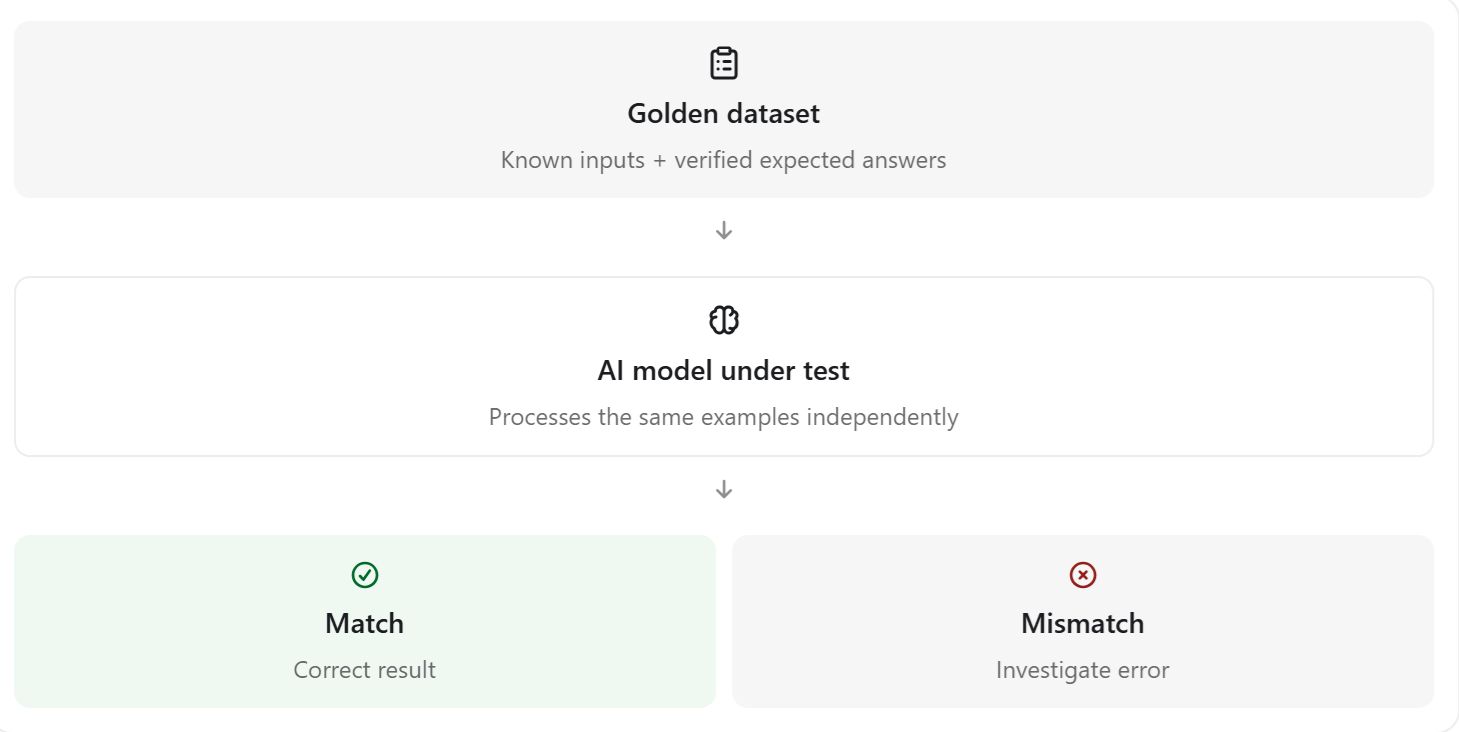
Unlike ordinary software tests, AI evaluation often needs to account for multiple acceptable answers, not just exact text matches.

Everyday application: Validate AI-generated engineering summaries

Suppose you use AI to summarize firmware defects. Before trusting it for routine work, prepare five anonymized defects with verified root causes and expected summaries.

Run the AI against these examples and check whether it preserves important technical facts.

Evaluate an AI firmware defect summarizer using these three examples:

  1. Input: Drive 14 reports 202170 POH; verified value is 5562.
    Expected: Identify incorrect power-on-hours reporting without changing the verified value.
  2. Input: Firmware update times out; root cause not yet established.
    Expected: Report timeout and explicitly state that root cause is unknown.
  3. Input: Redfish endpoint returns HTTP 404 for a documented resource.
    Expected: Report missing resource; do not assume the cause.
    For each case, generate a summary and compare it against the expected answer. Identify factual errors, missing details, and unsupported assumptions. Do not treat the expected answer as model-generated evidence.

Spend five minutes reviewing the examples and testing the copied prompt. For a meaningful benchmark, keep the expected answers separate from the model being tested, then compare its outputs afterward.

Example Prompt: Drive 14 reports 202170 POH; verified value is 5562. What is the reason?

Responses

  1. Chatgpt:
    1. The numbers have an exact split: 202,170 = 5,562 + (3 × 65,536). In hex, 202,170 is 0x000315BA; its low 16 bits are 0x15BA, or 5,562.
    2. That points to the report combining an extra high-order value (3) with the POH count—likely a SMART data decoding or field-width issue. I can’t confirm which field was included without Drive 14’s raw SMART data and the report source; those aren’t in the workspace.
  2. Meta:
    1. It’s a decoding error, not real usage.
    2. 202,170 hours = ~23 years powered on continuously, which is impossible for this drive.
    3. 5,562 hours = ~232 days powered on, which is plausible.
    4. The maths
    5. $$202170 – 5562 = 196608$$
    6. $$196608 = 0x30000$$
    7. In hex:
    8. Reported value: 0x315BA
    9. Verified value: 0x15BA = 5,562
    10. So the reporting tool is including extra vendor-packed bits 0x3 in the high part of the raw value. The true Power-On Hours are in the low bits.
    11. This is a known Seagate SMART quirk: Seagate packs several counters into one raw value, so large raw values look alarming when read as a single decimal count. Other reports show the actual hours stored in the lower bytes, with the upper bytes carrying separate/fractional data.
    12. What to trust
    13. Use 5,562 hours.
    14. Check it with a tool that interprets Seagate SMART correctly, such as Seagate SeaTools, or view the raw value in hex and read only the low-order POH field.
  3. Gemini:
    1. The discrepancy is caused by a vendor-specific multi-byte SMART encoding (most commonly seen in Seagate drives) where additional data is packed into the upper bytes of the raw Power-On Hours (POH) field. [1, 2]
      Mathematical Breakdown


      Reported Value (202170): In hexadecimal, this value is 0x0000000315BA.
      Verified Value (5562): In hexadecimal, your actual hours are 0x0000000015BA.
      The Difference (196608): The extra 0x30000 (which equals 3 × 65,536 hours) sits in the third byte of the 6-byte raw SMART attribute field.

      Why This Happens


      Packed Raw Fields: The S.M.A.R.T. Attribute 9 raw data field is 48 bits (6 bytes) long. While the lower 16 bits (0x15BA) store the actual power-on hours, certain drive manufacturers pack internal counters, sub-hour timers (such as fractional hours or minutes), or state flags into the upper bytes. [1, 2, 3]
      Unparsed Raw Output: Monitoring software that reads the entire 48-bit integer directly—without masking out the upper vendor-specific bytes—displays 202170 instead of 5562. Tools that apply vendor-specific parsing rules (like smartmontools) isolate the lower 16 bits and report the true 5562 hours. [1, 2]

      If you’d like, share:

      The drive brand and model
      The monitoring tool reporting 202170
      I can tell you the exact flag or setting to make it display the verified value.
      print(202170 / 5562) print(hex(202170), hex(5562)) print(202170 - 5562) print(hex(202170 - 5562))

      [1] https://forums.unraid.net
      [2] https://forums.tomshardware.com
      [3] https://stbsuite.com

Today’s takeaway: A golden dataset lets you measure AI quality against known, verified examples before relying on it for real work. It also provides a repeatable way to detect regressions when changing models or configurations.
Practical AI: Quantization

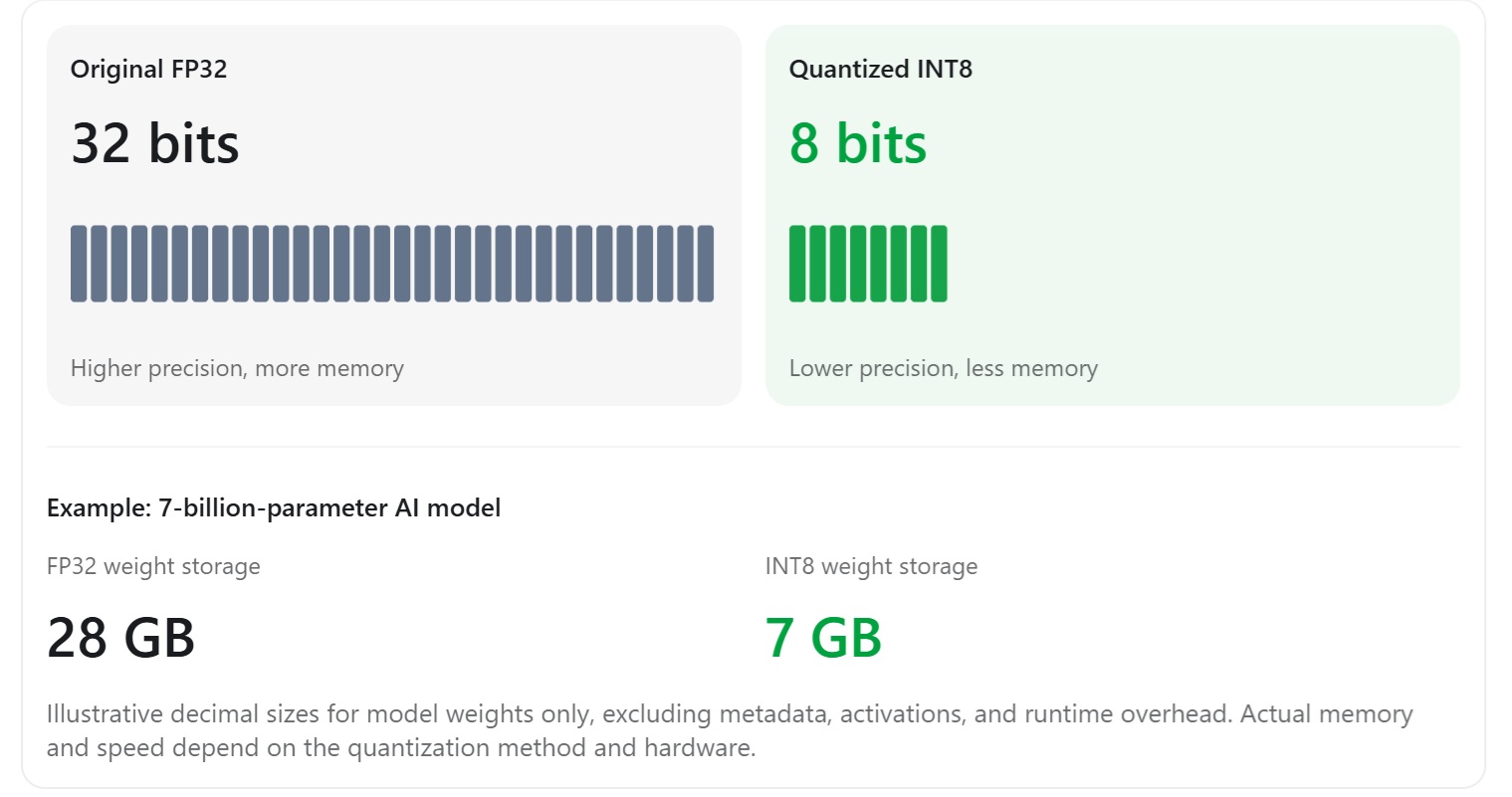
Quantization is a technique that reduces the memory and computing resources needed to run an AI model by representing its numerical parameters with fewer bits.

For example, instead of storing model weights using 32-bit floating-point numbers (FP32), we can approximate them using 8-bit integers (INT8).

This can make AI models more practical to run on laptops, edge devices, and local servers.

How quantization works

Apply it today: Run AI locally

Suppose you want to experiment with an AI model on your laptop or a local engineering lab server.

A full-precision model might require too much memory. A quantized version of the same model could fit on your available hardware without requiring a cloud inference service.

Your 5-minute exercise

I want to run a 7-billion-parameter AI language model locally. Compare FP32, FP16, INT8, and 4-bit quantization in terms of approximate model-weight memory, inference speed, accuracy trade-offs, and hardware requirements. Recommend which format to evaluate first on a computer with 16 GB RAM. Clearly identify assumptions.

Compare the estimated memory requirements and identify a configuration that could fit your machine. Remember that smaller models are not automatically faster on every processor, and aggressive quantization can reduce answer quality.

Today’s takeaway: Quantization makes AI deployment more resource-efficient by reducing numerical precision. It is especially valuable when running AI locally, where memory, power, and hardware costs matter.

Practical AI: Natural Language Processing

Natural Language Processing, or NLP, is the AI technique that helps computers understand, process, and generate human language.

Examples:

Gmail suggests short replies.

ChatGPT understands your questions.

In simple words, NLP helps AI answer:

“What does this human message mean, and how should I respond?”

Apply it today

Use NLP to simplify long information.

When you receive a long email, meeting note, article, or document, ask AI to extract the key points.

Try this prompt:

“Summarize this text in 5 bullet points. Highlight the main action items, deadlines, and risks.”

Daily life benefit

NLP saves time by turning long or confusing text into clear, usable information.

A simple habit:

Before reading a long document fully, ask AI for a summary first. Then read only the important sections in detail.

Practical AI: Prompt Chaining

Prompt chaining is a technique where you divide a complex AI task into a sequence of smaller prompts. The output of one step becomes the input for the next.

How it works

Extract => Prioritize => Plan

Each step produces a result that the next step uses.

Apply it today: Organize your daily tasks

Try this three-step AI workflow with your personal or engineering task list.

Step 1 — Extract

“Review my notes and identify all pending tasks, owners, and deadlines. Do not assume missing information.”

Step 2 — Prioritize

“Using the extracted tasks, rank them by urgency, importance, and dependencies. Explain the top three priorities.”

Step 3 — Schedule

“Using the prioritized tasks, create a realistic plan for today with estimated durations and breaks. Flag scheduling conflicts.”

Today’s takeaway

Prompt chaining can improve control, transparency, and consistency in multi-step AI workflows. Its main advantage is that you can inspect and correct intermediate results before errors propagate into later steps.

Try applying it to meeting summaries, household planning, travel preparation, or engineering validation activities.

Practical AI: AI Agents (Agentic AI)

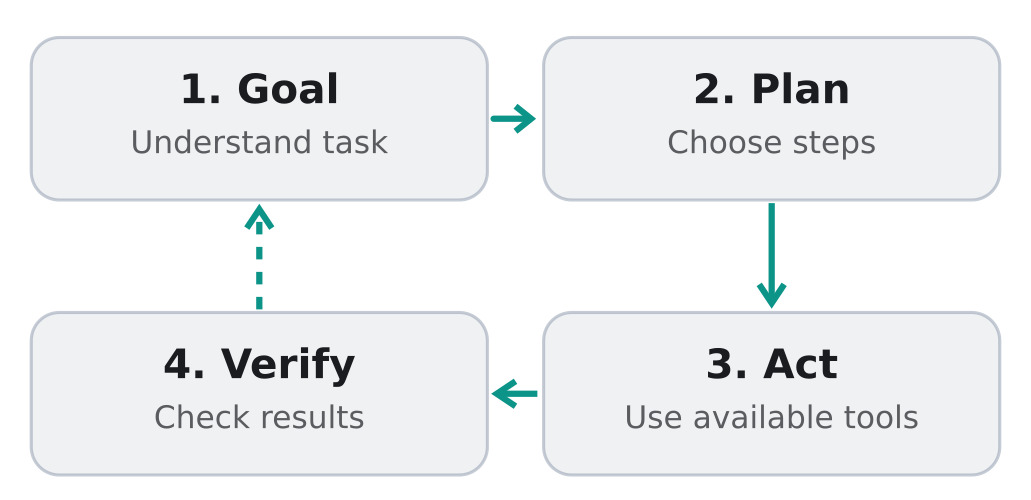
An AI Agent is an AI system that can plan tasks, use available tools, take actions, and evaluate results to achieve a goal.

Unlike a traditional chatbot that primarily answers questions, an AI agent can carry out a multi-step workflow when it has the appropriate tools and permissions.

How an AI Agent works

The agent can repeat planning and execution when verification shows a problem.

Apply it today: Plan your day using an AI agent

Imagine asking an AI agent:

“Review my calendar, pending tasks, and important emails. Identify scheduling conflicts, prioritize my activities, and prepare a realistic plan for today.”

With connected tools and permission, an agent could inspect your calendar, identify conflicting commitments, draft responses, and propose schedule adjustments.

Without those integrations, AI can still help you prepare a plan from information you provide.

Try this practical prompt

Act as my personal productivity agent. Review the meetings and tasks I provide. Identify my three most important priorities, suggest an efficient schedule, and highlight any conflicts or dependencies. Explain your recommendations. Ask for approval before making any changes.

AI lesson: Chatbot vs. AI Agent

ChatbotAI Agent
Answers questionsPursues goals
Generates suggestionsCan execute actions with tools
Usually responds one step at a timeCan coordinate multiple steps
User drives each stepCan proceed within approved boundaries

Today’s takeaway: AI agents move from generating answers toward getting tasks done.

5-minute challenge: Give AI your top five tasks for today and ask it to create an actionable execution plan with priorities, time estimates, and dependencies.

Practical AI: Few-Shot Prompting

Few-shot prompting is a technique where you give AI a few examples of the results you want before asking it to perform a similar task.

Unlike zero-shot prompting, which provides instructions without examples, few-shot prompting helps AI understand your preferred format, categories, and decision rules.

How it works

Give examples=>AI identifies pattern=>Apply to new tasks

Apply it today: Organize your daily to-do list

You can teach AI your task-prioritization preferences using three examples.

Classify my tasks using these examples:

Example 1: “Submit a report due today” → Urgent
Example 2: “Learn AI for 20 minutes” → Learning
Example 3: “Await vendor response” → Waiting

Now classify my remaining tasks using the same categories. Explain each classification briefly. Do not assume missing deadlines.

Key takeaway

Few-shot prompting = Instructions + Examples + New Task.

The AI uses your examples as temporary context; it does not permanently retrain itself. Good examples can improve consistency, but you should still verify the output

Challenge: Compare the AI’s classifications with your own and see whether providing examples improves accuracy.

Prompt Response example

From the Snella Task Log, I found one task with a specific overdue deadline and two explicitly waiting on others:

  • Urgent: T085
  • Waiting: T096
  • Waiting: T114

The other logged tasks are open, active, planned, or under investigation, but the log doesn’t identify them as learning tasks or give them a deadline that would make them Urgent. I’ve left them unclassified rather than infer a category.

Practical AI: Human-in-the-Loop

Human-in-the-loop means AI performs part of a task, but a person reviews, corrects, or approves the result before it is used.

Examples include:

  • AI drafts an email; you verify the tone and facts.
  • AI identifies suspicious transactions; a person decides whether they are fraudulent.

In simple words:

Let AI accelerate the work, but keep human judgment for important decisions.

Use AI to prepare your daily task priorities, but approve the final order yourself.

Try this prompt:

“Review these tasks and rank them by urgency, importance, effort, and deadline. Explain the top three recommendations. Do not remove or postpone any task without highlighting it for my approval.”

Then review:

  1. Did AI understand the deadlines correctly?
  2. Is any important context missing?
  3. Would changing the order create a risk?

Why it is useful

AI can process information quickly, but it may misunderstand context or make unsupported assumptions. Human review combines AI’s speed with your experience and accountability.

A useful rule:

AI proposes; the human verifies and decides.